
 Mobile · Tools
 Gesture Volume
Volume control without the buttons.
Control your volume with an on-screen gesture handler — save wear on physical buttons with a fully customisable swipe overlay and lock-screen gesture.

Highlights
What Gesture Volume does
Screenshots
See it in action
About this app
Gesture Volume is a powerful, open-source Android application that brings intuitive gesture-based volume control to your device. Control your media volume effortlessly using customizable edge gestures while reducing wear on your physical volume buttons.
Whether you want to extend the lifespan of your hardware keys or need an alternative solution for devices with damaged volume buttons, Gesture Volume offers a seamless and highly customizable experience.
✨ Features
🎛️ Smart Gesture-Based Volume Control
- Control device volume using edge swipe gestures
- Smooth and responsive gesture recognition
- Works system-wide across apps
🛠️ Customization Options
- Customize the appearance of the gesture handler
- Adjust position, size, and style of the gesture area
- Personalize the experience to match your workflow
👆 Gesture Actions
Assign click actions to the gesture handler
Lock the screen directly from the gesture handler
Configure separate actions for:
- Upper-half swipe gestures
- Lower-half swipe gestures
📱 Device Accessibility
- Reduce dependency on physical volume buttons
- Help extend the lifespan of hardware keys
- Ideal for devices with malfunctioning or broken volume buttons
🔒 Required Permissions
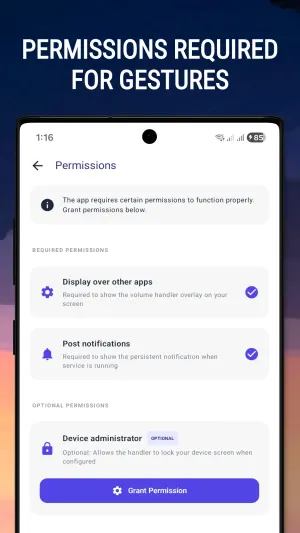
Gesture Volume requires the following permissions to provide its functionality:
| Permission | Purpose |
|---|---|
READ_EXTERNAL_STORAGE |
Access required resources and files |
SYSTEM_ALERT_WINDOW |
Display the gesture handler overlay |
FOREGROUND_SERVICE |
Keep the gesture service running reliably |
WAKE_LOCK |
Maintain service responsiveness |
RECEIVE_BOOT_COMPLETED |
Automatically restart the service after device reboot |
📸 Screenshots Note
The screenshots shown in this repository display the volume panel from Samsung One UI 5.1.
The actual volume dialog displayed on your device will be the default volume panel provided by your device manufacturer and Android version. Appearance and behavior may vary across different devices.
🚀 Open Source
Gesture Volume is fully open source.
Source Code
Repository: https://github.com/imamhossain94/GestureVolume
Contributions, bug reports, feature requests, and pull requests are welcome.
🙏 Credits
Icons
- SVG icons provided by SVGrepo
Animations
- Lottie animation by S M Rony
🔗 Links
Project Repository
https://github.com/imamhossain94/GestureVolume
Icon Resources
Lottie Animation
https://lottiefiles.com/110200-mobile-setting
❤️ Support the Project
If you find Gesture Volume useful, consider starring the repository, sharing it with others, or contributing to the project.
Enjoy effortless volume control with Gesture Volume!


